
Move beyond chatting with AI. Learn how to delegate real work using an AI harness that connects models to your files, calendar and daily workflows.
Most people begin their AI journey by talking to it.
You type a prompt. It types an answer. The experience feels like using a very smart search engine that talks back.
That is useful, but it is only the beginning.
The real productivity shift happens when you stop asking for answers and start delegating tasks. You do not just want a draft. You want the research completed, the spreadsheet organised, the presentation prepared or the meeting scheduled.
To do that, you need an AI harness.
The intern and the Iron Man suit
Think of a raw AI model as a brilliant, eager intern sitting in an empty room. The intern can reason, write, and answer questions from everything it learned in training. But it can’t see your current project, open your files, or check your calendar. It has a brain, but no reach.
A harness gives that brain a suit to work in.
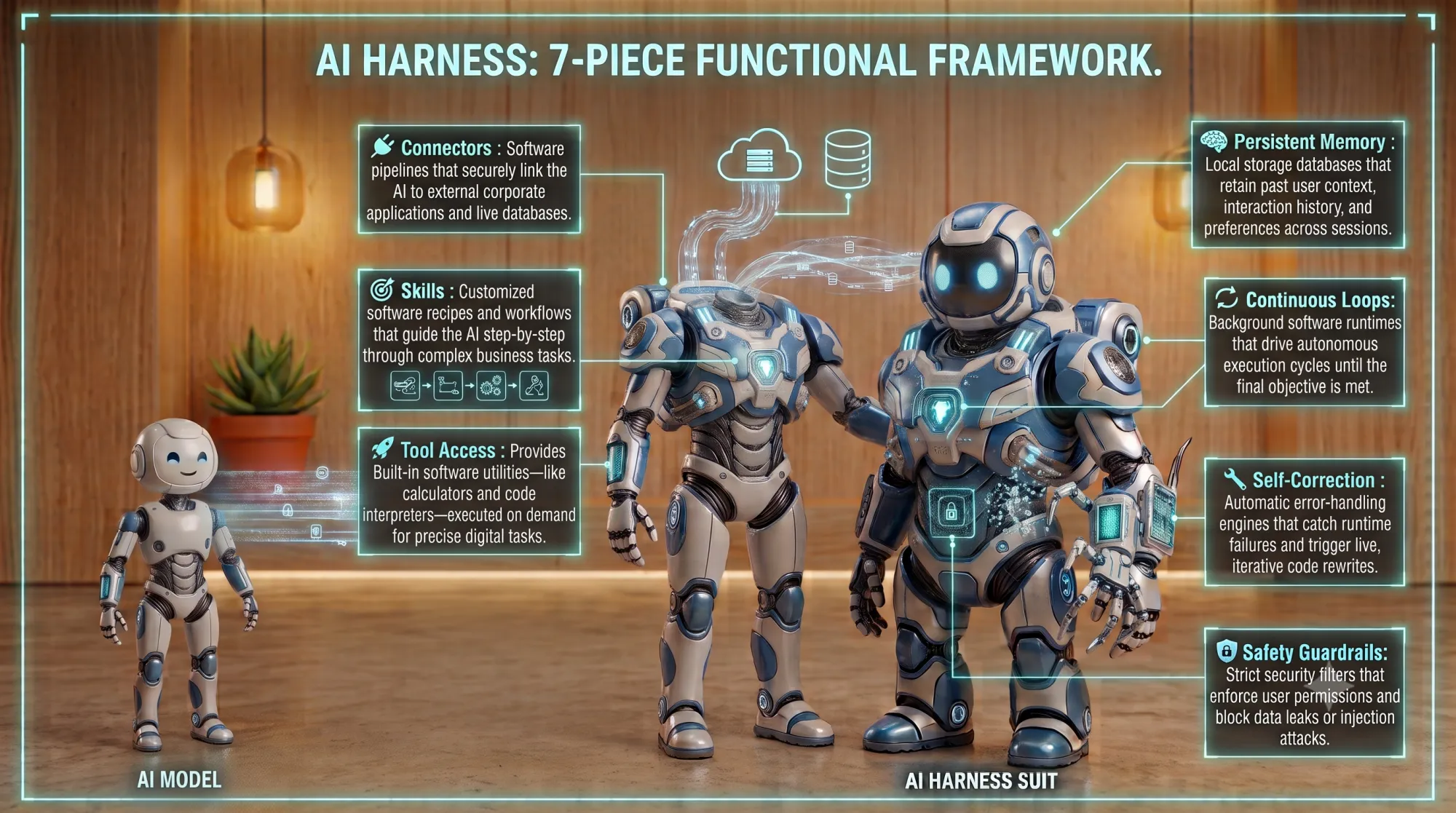
Like Tony Stark’s armor, the harness wraps the model in an environment. It connects to your files, applications, websites, calendars, and tools, and it adds the controls that make real delegation possible: permissions, memory, context, task planning, approval steps. The model supplies the thinking. The suit gives it somewhere to stand and something to act on.
And here’s the part most people miss: the suit is modular. You can install skills — packaged capabilities that teach the harness to do a specific job a specific way. Some come built in. The powerful move is building your own, from your team’s best practices and the workflows you already trust. And skills don’t just describe work — they reach into the tools you already use, your email, your calendar, your design apps, so the work actually gets done where you work.
That’s the difference between an AI that gives a very good answer and one that produces finished work — done the way your team does it, in the format your team actually uses. A skill turns “here’s a decent draft” into “here’s the report, in our template, following our process.”
It’s also why two people can run the exact same model and get completely different results. Same brain, different suit — and different modules bolted on.
So: which harness is best?
The short answer
There is no single answer. It depends entirely on how you work. I have categorized the best options into three distinct personas. See which one sounds most like you.
If you want a quick starting point, these are my current picks:
| If you value | My Pick (as of writing) |
|---|---|
| Intuitiveness and performance | Claude CoWork (Claude Desktop App) |
| AI model choices and flexibility | OpenWork |
| Extensibility and productivity | Zed |
Persona 1: The Intuitive Delegator
You value intuitiveness and performance. You might not be highly technical, but you want something that works beautifully, feels natural, and helps you get your work done without a steep learning curve.
My Pick: Claude CoWork (Claude Desktop App)
Claude CoWork is the overall winner for capability and intuition. It is the most capable harness for non-coders, provided you are comfortable relying entirely on Anthropic’s models.
- Model Flexibility (★★☆☆☆): Designed and optimized specifically for Anthropic models.
- Usability (★★★★★): The most UX-driven and inclusive platform. It helps non-tech-savvy users explore and feel comfortable interacting with agents.
- Capability / Functionality (★★★★☆): Comes with a rich directory of skills, connectors, and plugins. New users can leverage this extensibility immediately, even before customizing their own workflows.
- Cost-Performance (★★★★☆): The Claude desktop app itself is free to download — but Cowork lives behind a paid plan (Pro, Max, Team, or Enterprise). For readers who can’t easily access a subscription, whether by budget, region, or company policy, that’s a real barrier, and it’s the main thing holding this pick back from a clear recommendation. For those who do have a plan, the smooth, well-designed experience means you get a lot of value for what you pay.
Use Case Example: Presentation Generation
Say I need to research a topic and turn the findings into a PowerPoint. This is a common enough job, and it’s a good way to see how a harness works — because Claude comes with a few built-in skills that handle it end to end:
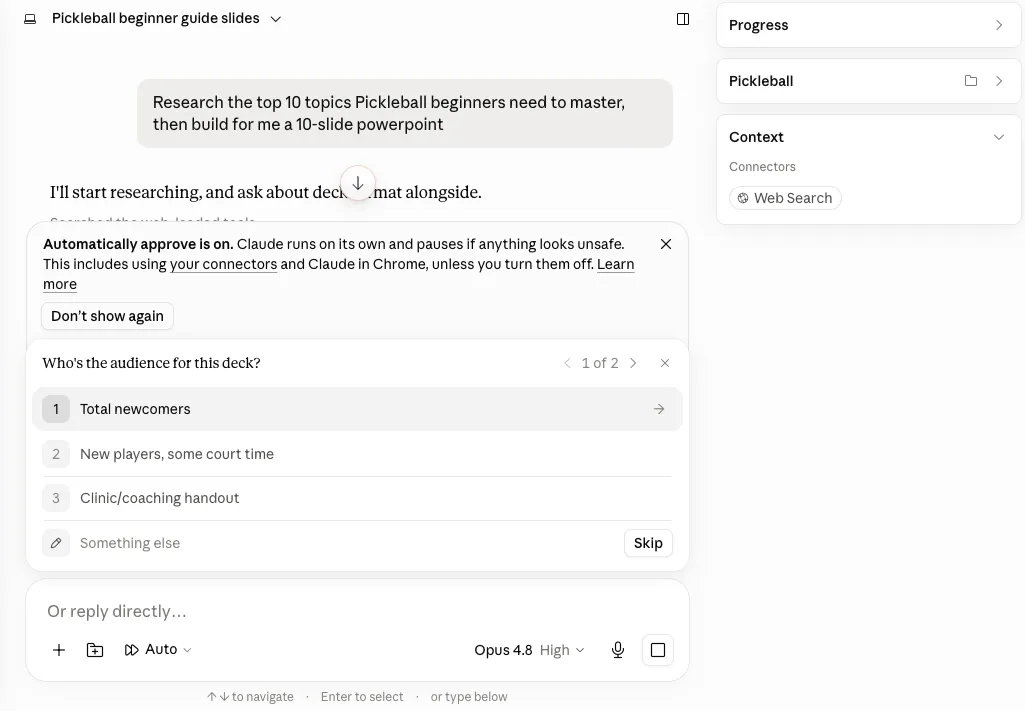
- Ask User Question — before starting, it interviews me to pin down what I actually need.
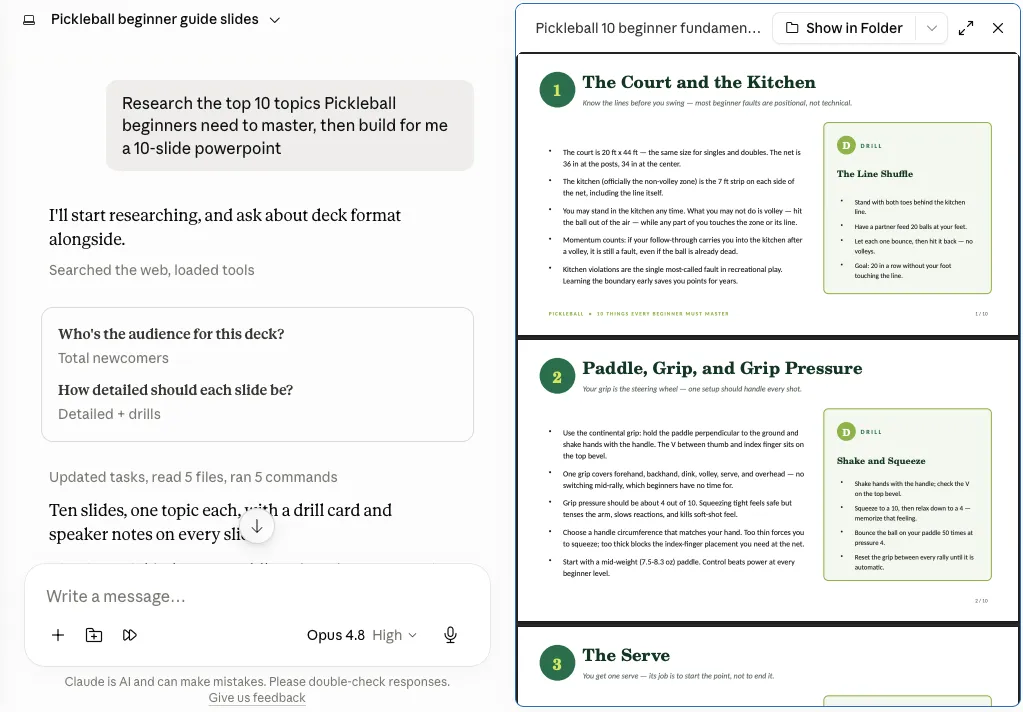
- Research and web search — it goes and gathers the source material itself.
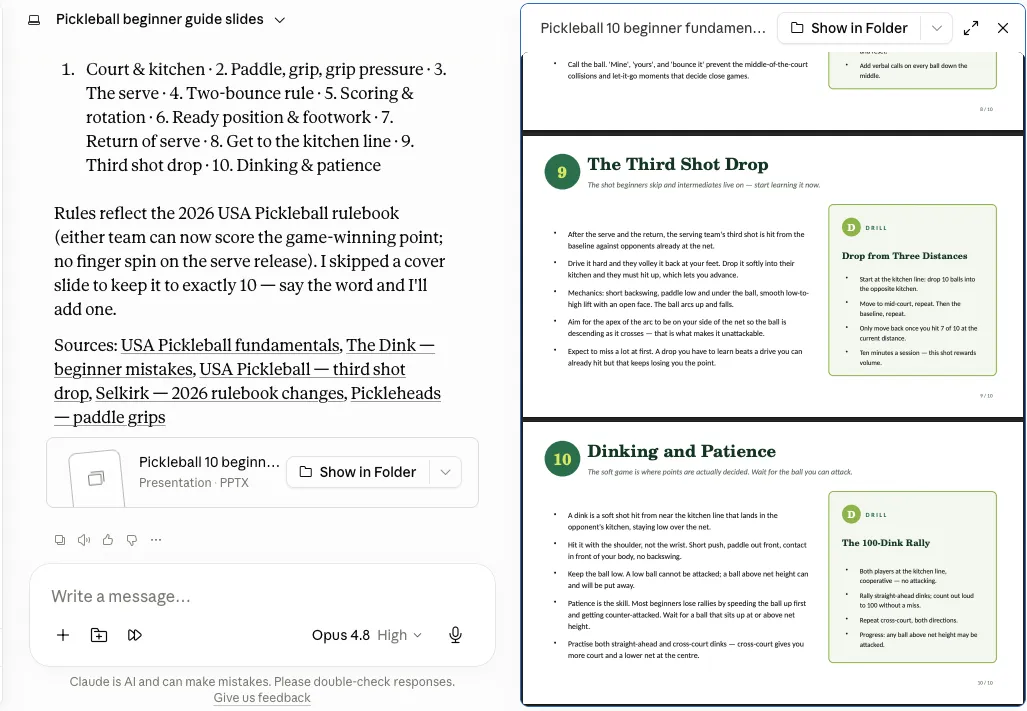
- PowerPoint (PPTX) — it builds the findings into a finished deck.
-
Claude uses Ask User Question to clarify the brief — here, who the deck is for and how detailed each slide should be.
-
It runs its research and web search skills to gather and verify the material.
-
It invokes the PPTX skill to produce the finished ten-slide deck, drill cards and speaker notes included.
Why not ChatGPT Work?
ChatGPT Work is OpenAI’s latest harness targeting non-coders. While it tries to make onboarding intuitive, it is almost too eager.
Right away, it prompts you to connect your documents, emails, and calendars. For a beginner, this can be overwhelming. It exposes the user to deep integrations before they even understand what those permissions mean or whether they actually want the AI accessing that data.
Secondly—and this is the main reason it is not my top pick—the performance currently feels sluggish. Even when using GPT 5.6 Sol medium (the model choice most agree hits the sweet spot for power, speed, and cost), it consistently takes a long time to present content. But notice as of writing, ChatGPT Work is just recently launched, and performance issues can likely be addressed in near future.
Persona 2: The Flexible Navigator
You value AI model choices and flexibility. You might face company restrictions on certain models, or you simply want the freedom to route different tasks to different providers. You need a tool that works well but doesn’t lock you into a single ecosystem.
My Pick: OpenWork
OpenWork is for people who want control over which AI model does the thinking.
Instead of committing to a single vendor, it lets you bring your own API keys and switch between models — a fast, inexpensive model to summarize industry news, then a stronger reasoning model to turn that summary into strategic analysis.
A bit of background helps here. OpenWork is a free, open-source desktop app (Mac, Windows, Linux) built on OpenCode. The core app is free to use; you supply your own model provider keys. Two things sit behind a paid plan: using OpenWork’s own managed models (so you don’t have to bring your own keys), and the team features for sharing setups across an organization.
- Model Flexibility (★★★★★): OpenWork supports any model the OpenCode engine supports (OpenCode is the open-source backend behind OpenWork). OpenCode Zen is the built-in provider and offers a selection of free models out of the box. Bring-your-own-key, AI aggregators like OpenRouter, and offline models are all supported too.
- Usability (★★☆☆☆): Setup asks for a bit more comfort with API keys and models.
- Capability (★★★★☆): Highly flexible for multi-step workflows.
- Cost-Performance (★★★★☆): Bring-your-own-key model: You connect your own provider keys and pay each provider for usage, and the app itself is free. Worth noting: an existing ChatGPT Pro/Plus subscription can be connected directly, but Anthropic connects by API key only, not through a Claude subscription.
Use Case Example — Data Analysis & Dashboard Generation
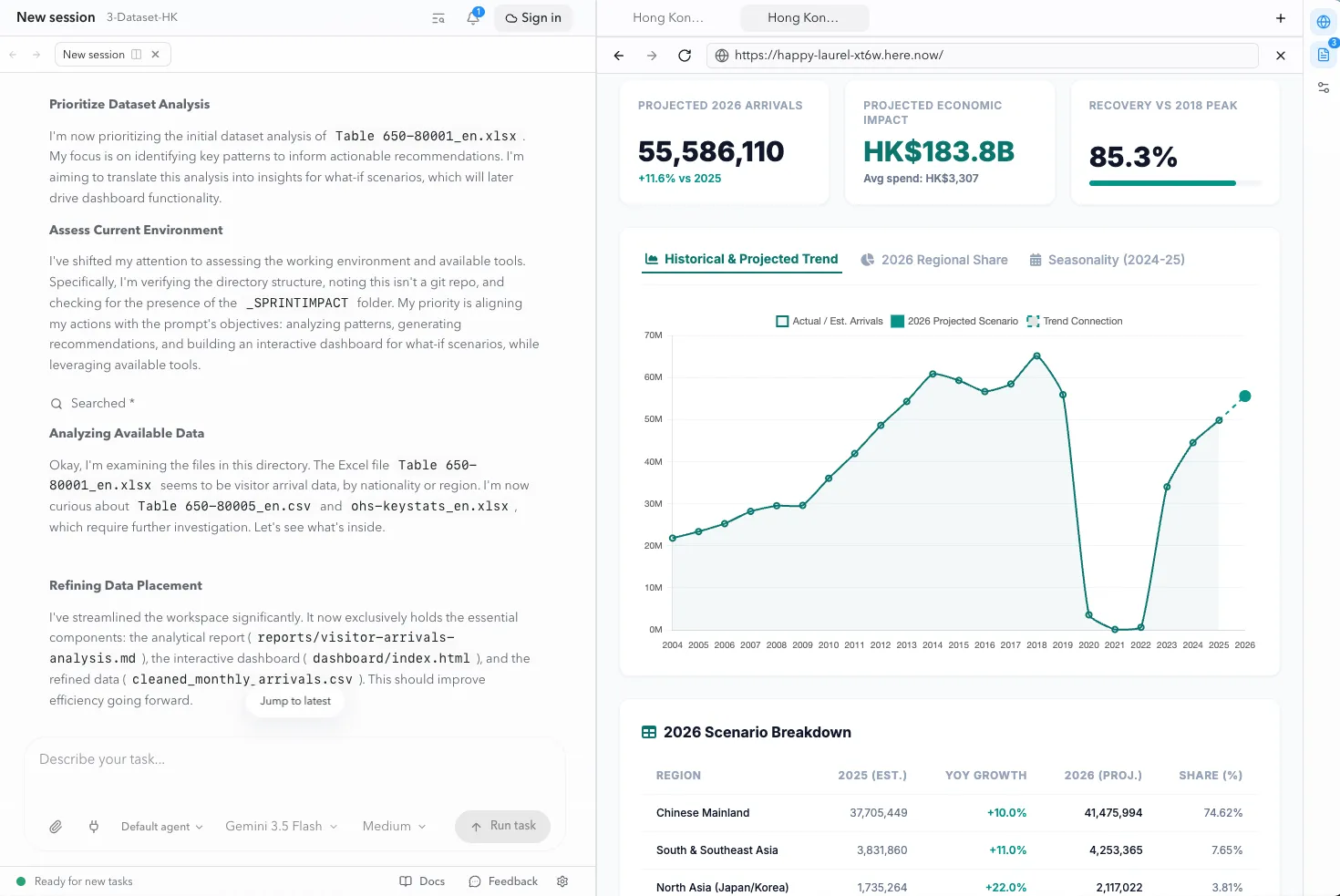
Data analysis is where the choice of AI model matters most. In this example, I used the Gemini model as the brain, and the OpenWork harness gave it what it needed to work: access to the dataset, the environment to process the findings, and the tools to design and code the dashboard into a presentable result.
The payoff is what that dashboard unlocks. Instead of reading a static report, one can explore the data — filter it, adjust assumptions, and watch patterns and what-if scenarios update in real time. A raw government spreadsheet becomes something you can actually interrogate, faster and more freely than paging through a document, and without writing a line of code.
How about Zo Computer?
Zo Computer is a beautifully designed product. Signing up is effortless, and you get free credits to start — no credit card needed. For absolute beginners, it’s a very welcoming front door.
What sets Zo Computer apart is its philosophy. It’s built around giving each person their own AI agent and a dedicated space to work in, rather than a chat window. The experience leans toward handing a task to an assistant and letting it run with it.
- Free tier: A daily allowance of free AI usage on basic models — enough to get real work done before you spend anything.
- Ready-made skills and integrations: A rich catalogue you can install and mix to fit your workflow (see image) — email, files, tasks, calendars, design tools, and more.
- Curated model choice: You can’t bring any model you like, but Zo offers a wide selection across price tiers — so you can match the right model to each task.
Worth a look if you’re drawn to its approach, especially as a low-commitment way to try working with an AI agent. If you’d like to give it a try, you’re welcome to use my invite code (referral link).
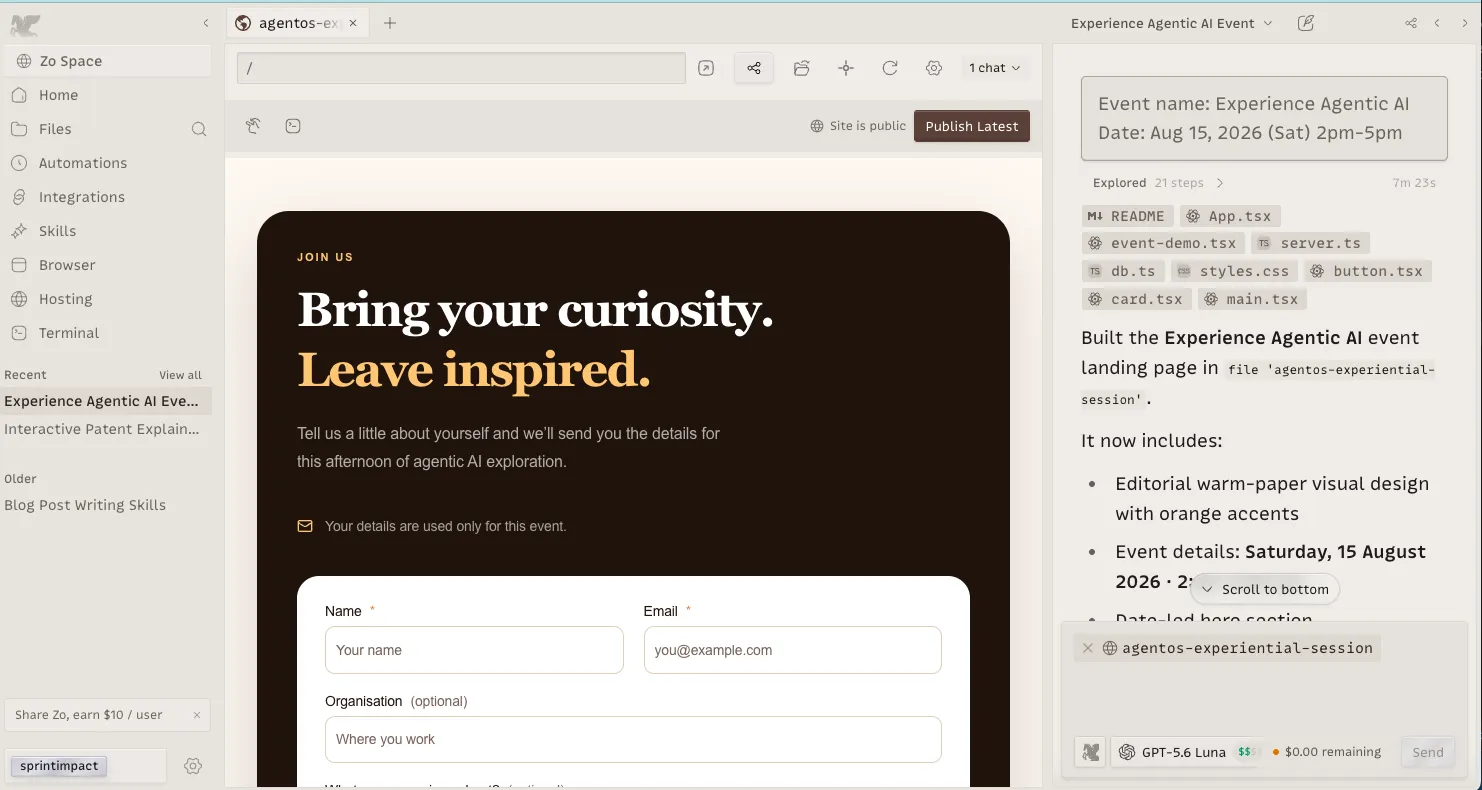
Because Zo Computer already runs as a server on the internet, it’s at its best when the work you need done also lives on the internet — creating and hosting landing pages, event invites, and the like. The result goes live at a real URL the moment it’s ready, with nothing to export or deploy.
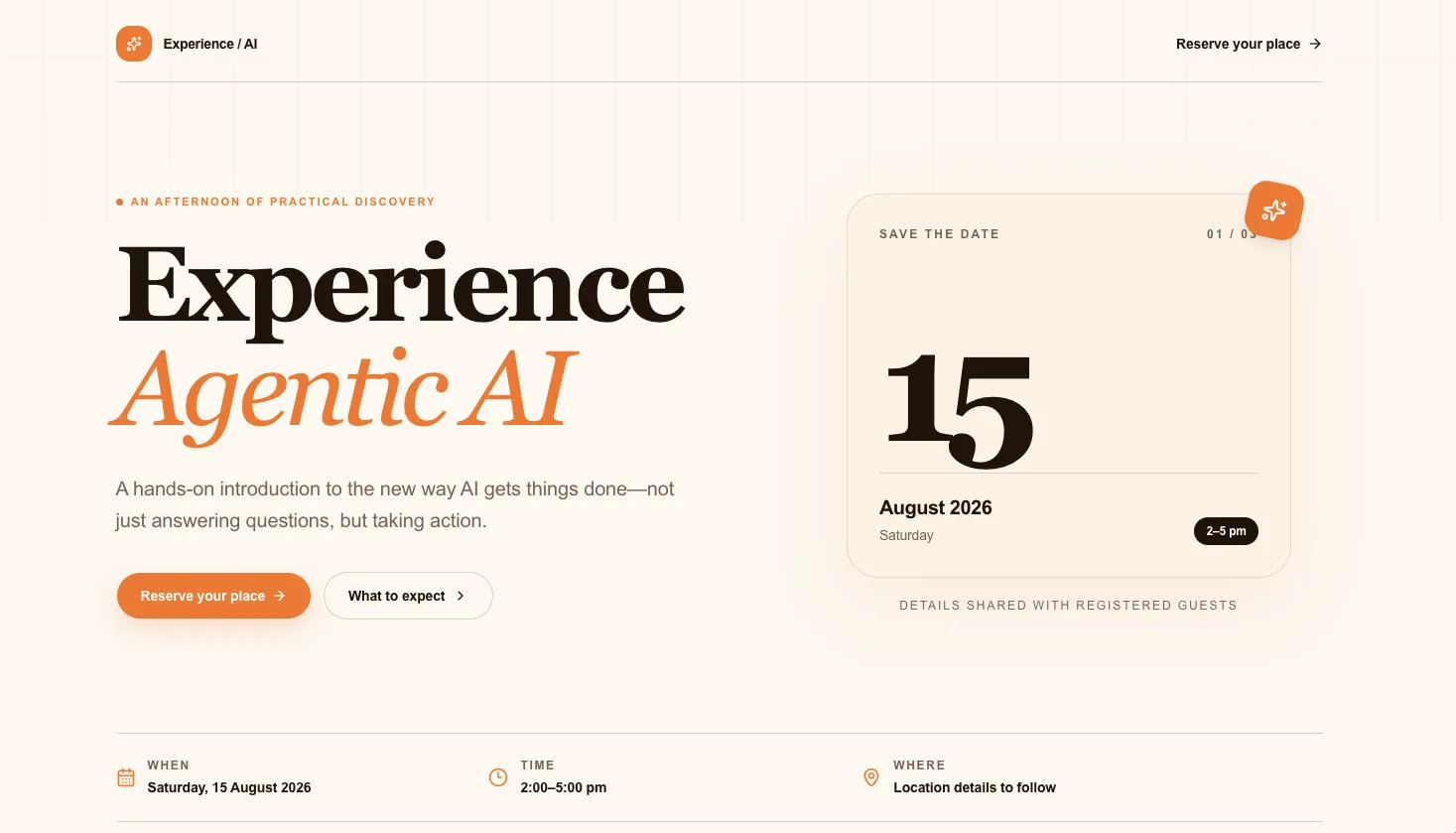
Note the trade-off between plans: on the free plan, your server goes to sleep when it’s inactive; on the basic plan, it stays always on — so your page keeps responding to visitors around the clock.
But OpenWork wins for one critical reason: local context.
Both are genuinely good — so what decides it? OpenWork reads the files on your computer directly. Zo Computer relies on cloud sync to push those files up to its server first. And when you’re giving an AI agent context to work with, direct local access is faster, more private, and more reliable than keeping a cloud sync in order. Fewer moving parts, fewer things to go wrong — simplicity wins.
Persona 3: The Power Builder
You value extensibility and productivity. You’re a power user, willing to invest time into building AI workflows for your core tasks. You’re happy to climb a small learning curve in exchange for parallel, multi-threaded agent use — with transparency and control as the priority.
My Pick: Zed
Zed is a lightning-fast environment with exceptionally capable agent features.
It’s built with technical users in mind, but its real strength for a power builder is working several projects at once, each in its own context — one agent pointed at one folder, another running a different task against a different set of files, all in parallel inside a single window. Each thread is tailored to its own job, yet you manage them all from one place, with transparent control over exactly what every agent is doing and changing.
- Model Flexibility (★★★★★): No single-provider lock-in. Zed supports a wide range of models — native AI, bring-your-own-key API connections, third-party model aggregators, and even local backends. A Zed Pro subscription is optional throughout.
- Usability (★★★☆☆): At first glance it can feel overwhelming — agent threads, a conversation pane, an editor pane, and a file explorer all at once. But once you’re familiar, having everything in one place beats juggling several separate tools cluttering your desktop.
- Capability (★★★★★): Fast and memory-efficient, and built to run multiple agent tasks in parallel without bogging down.
- Cost-Performance (★★★★★): This is where ACP (Agent Client Protocol) pays off. Zed lets you run a polished agent-and-model combo right inside its interface — Claude Code with Anthropic’s models, or Codex with OpenAI’s — each pairing tuned to work at its best, rather than a generic agent bolted onto whatever model. And as of now, you can use these with your existing Claude or OpenAI subscription, so you’re not paying twice for tools you already have. That combination — best-in-class pairings, no new bill — is what earns the five stars.
Use Case Example: AEO Performance Audit → Interactive Dashboard
I used Zed to run an AEO (AI-search optimization) audit comparing five self-financing universities in Hong Kong — measuring how well AI engines like ChatGPT, Perplexity, and Gemini can reach, read, and trust each school’s website.
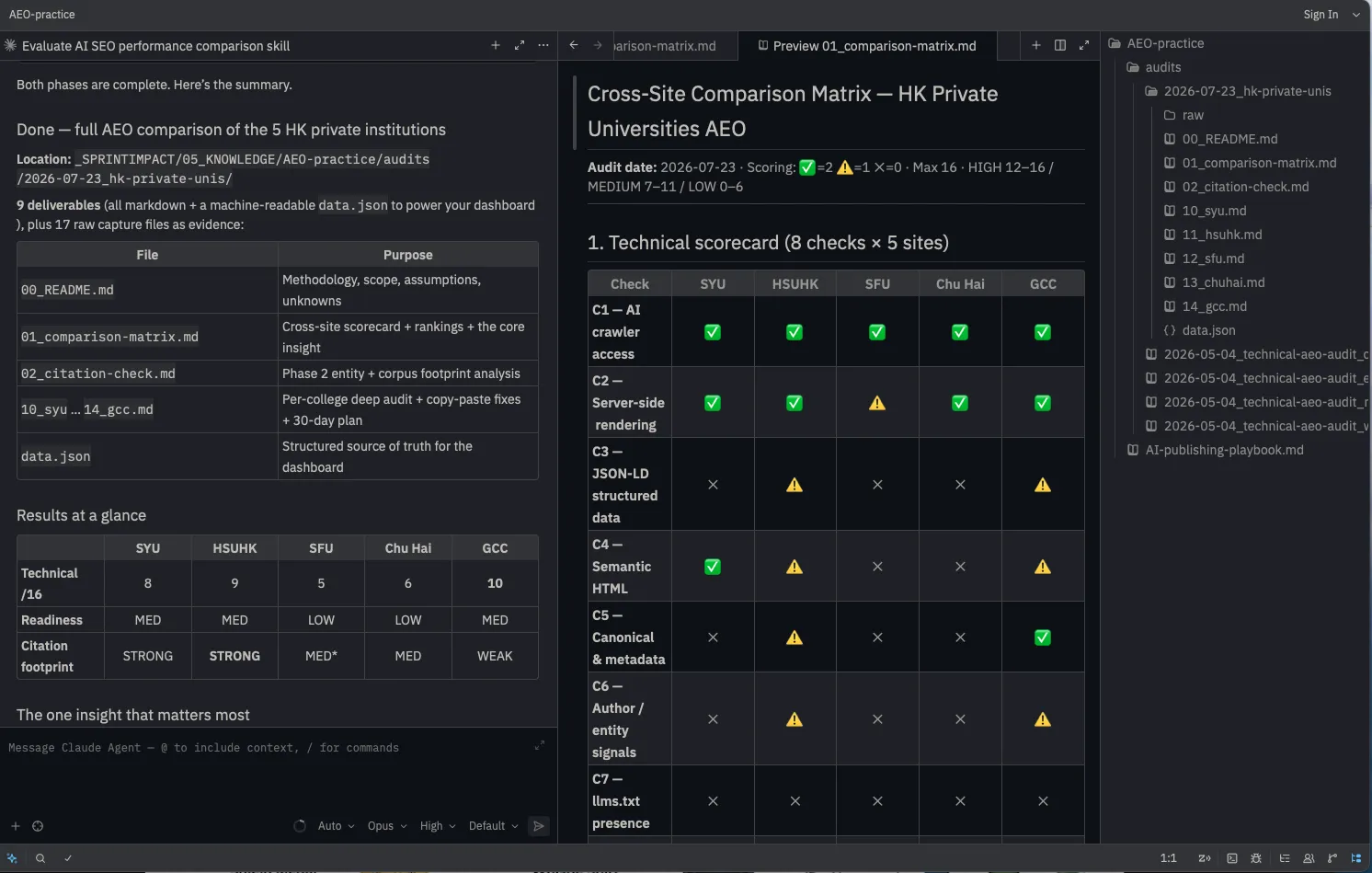
This is where a power builder’s setup pays off. Rather than a generic agent, I ran a skill I built myself — my own audit methodology, scoring rubric, and output format, packaged so the agent applies it the same way every time. The agent worked through each site against an eight-point technical checklist plus a citation-and-authority check, wrote up its findings as structured markdown reports (one per school, plus a cross-site comparison matrix), and produced a machine-readable data file. From that, it built an interactive dashboard — a ranked scoreboard and comparison view — so the whole audit becomes something a client can explore rather than a document they have to read.
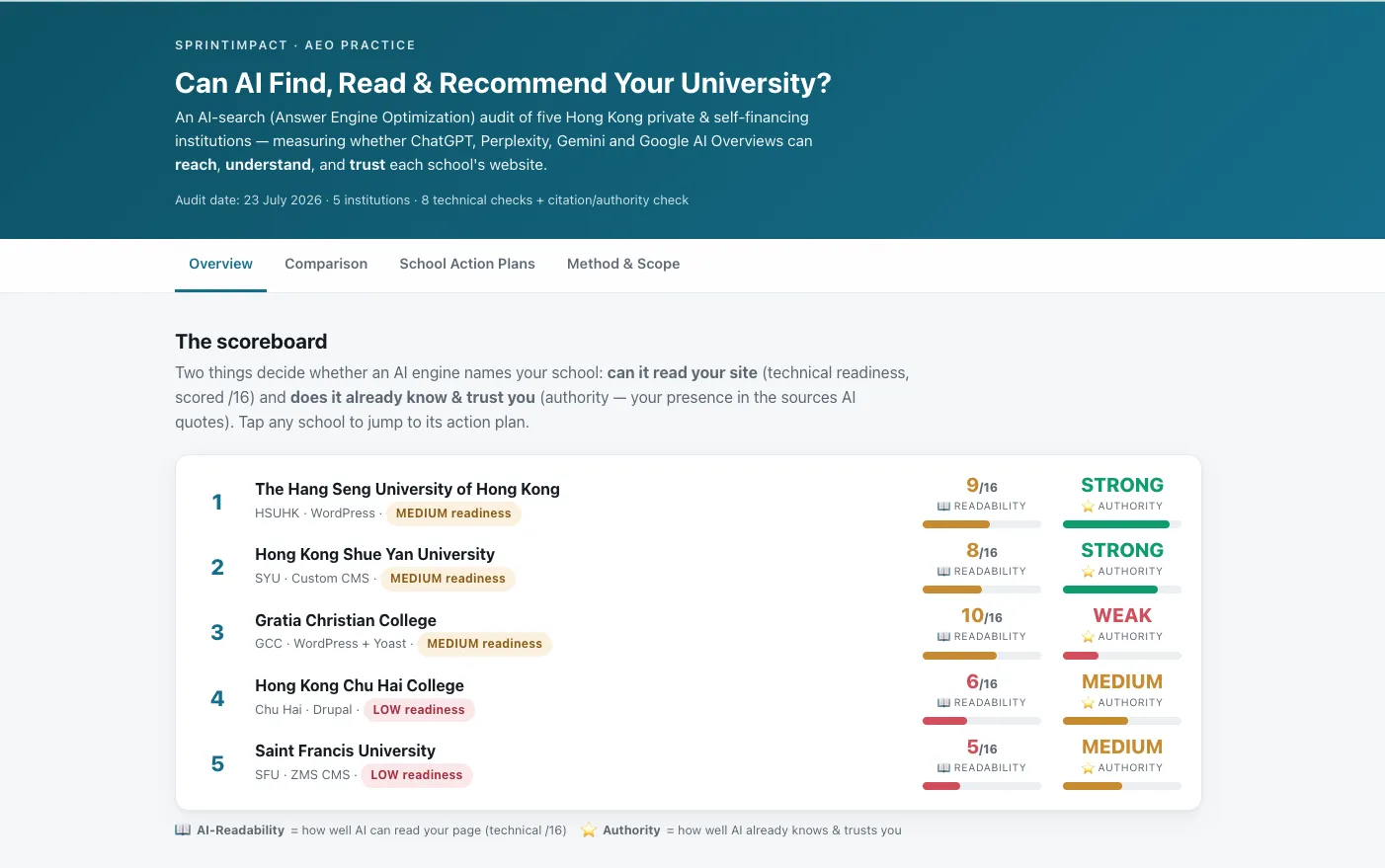
The point isn’t the audit itself. It’s that the same tool did research, analysis, structured reporting, and presentation in one place — all shaped by a skill I control, in the format my clients actually use.
I’ve kept the live dashboard private since it names and scores specific institutions — but if you’d like to see the interactive version, feel free to reach out and I’ll share access.
Why not OpenClaw or Hermes?

OpenClaw and Hermes are highly autonomous agents. They are designed with massive flexibility—they can research and install new “skills” they find promising, or spawn sub-agents to complete tasks without asking for human approval.
It feels magical. But for many users, that magic comes at the cost of control.
Unless you deeply understand their inner design and setup, you lose the steering wheel. They are fascinating tools for advanced experimentation, but for dependable, transparent daily productivity, Zed gives the power user much better visibility into the work being done.
The harness will change. Your context should not.
Choosing the right harness is an important step. But the quality of your AI’s work still depends on the context you give it.
We are in a world where new AI models and harnesses are launching faster than we can imagine. If you chase every new tool without a system, you will quickly run into the exact problem I faced.
I found myself testing different harnesses, and suddenly my digital life was scattered. My project files were in one place, my templates were buried in old emails, and my custom AI instructions were spread across three different apps. Every time I tried a new harness, I was starting from zero.
More importantly, I was missing out on the most valuable part of working with AI: compound learning.
Compound learning happens when your agent gets better at serving you over time. Your prompts become shorter. Your workflows become repeatable. But that only happens if your context—your rules, your files, your past decisions—lives in one central, organized place, independent of the software you use to access it.
If you have a setup that offers you control, security, and productivity, that same setup can work for all harnesses.
This is exactly why I built the AgentOS Starter Kit. It is a guided way to set up your digital environment the “better way”—organizing your files, instructions, and boundaries so that your AI can actually find what it needs to help you.
The AI tools we use today will inevitably change. But once a solid system setup is in place, it is here to stay.
What is your next step?
If you have not tried an AI harness yet, my advice is simple: jump in.
Do not let the idea of “system setup” stop you from starting. Pick one of the tools above that fits your persona and give it a try. Experience what it feels like to delegate a real task instead of just chatting.
Once you see the magic of that first completed outcome, take some time to learn how “skills” and “connectors” can equip your AI agent to deliver even more meaningful work for you.
And when you are ready to build that permanent, organized environment so your AI can truly compound its learning? The AgentOS Starter Kit will be waiting for you.
If you want to learn more about setting up your own AgentOS, drop a comment or send me a message.